Lunes, Pebrero 8, 2016

Lesson 9: Computers as Information and communication technology


          In educational technology course 1 the role of computer in education was well discussed. It was pointed out that the advent of the computer is recognized as the third revolution in education. The first was the invention of the printing press; the second, the introduction of libraries and the third the invention of the computer, especially so with the advent of the microcomputer in 1975. Thus emerged computer technology in education
          Through the technology, educators saw the amplification of learning literacy. Much like reading, the modern student can now interact with computer messages; even respond to question or to computer commands. Again like writing, the learner can form messages using computer language or programs.
          Soon computer assisted instruction (CAI) was introduced using the principle of individualized learning through a positive climate that includes realism and appeal with drill exercise that uses color, music and animation. The novelty of CAI has not waned to this offered by computer-equipped private schools. But the evolving pace of innovation in today’s Information Age is so dynamic that within the first decade of the 21st century, computer technology in education has matured to transform into an educative information and communication technology (ICT) in education.

THE PC

Communication media                                                                                              Audiovisual media


    (Internet)                                                                                                                    (Multimedia)
   Email (text and video)                                                                                        Text, sound, graphics
   Chat rooms                                                                                                               chart, photos
   Blog sites                                                                                                                Power-point presentation
   News services (print, video clip)                                                                        CD, VCD, DVD player
   Music/movie/television room                                                                            CDVCD, DVD player
                                                                                                                                     Educational software
                                                                                                                                            (Internet)
                                                                                                                                     Educational websites
                                                                                                                                     Software’s , courseware’s
                                                                                                                                     School registration/ records
                                                                                                                                    Accounting                                                 

                                
FIGURE 6 – USES OF THE COMPUTER AS ICT IN EDUCATION
THE PERSONAL COMPUTER (PC) AS ICT

                Until the nineties, it was still possible to distinguish between instructional media and the educational communication media.

                Instructional media consist of audio-visual aids that served to enhance and enrich the teaching-learning process. Examples are the blackboard, photo, film, and video

                On the other hand, educational communication media comprise the media communication to audiences including learners using the print, film radio, and television or satellite means of communication.  For example, distance learning were implemented using correspondence, radio, television or the computer satellite system
                Close to the turn of the 21st century, however, such as distinction merged owing to the advent of the microprocessor also known as the personal computer (PC). This is due to the fact that the PC user at home, office and school has before him a tool for both audio-visual creations and media communication.

                To illustrate, let’s examine the programs (capabilities) normally installed in an ordinary modern PC:

v  Microsoft Office- program for composing text, graphics, photos into letters, articles, reports etc.

v  Power-point- for preparing lecture presentations

v  Excel- for spreadsheet and similar graphic sheets

v  Internet – access to the internet

v  Yahoo or Google- websites; email, chat rooms, Blog sites, news service (print/video) educational software etc.

v  Adobe reader- Graph/photo composition and editing

v  MSN- mail/chat messaging

v  Cyber link power- DVD player

v  Windows media player- Editing film/video

v  Game house- video games


Lesson 8: Higher Thinking Skills


In this lesson, we shall discuss four types of IT-based projects which can effectively be used in order to engage students in activities of a higher plane of thinking. To be noted id the fact that these projects differ in the specific process and skills employed, also in the ultimate activity or platform used to communicate completed products to others.
            It is to be understood that these projects do not address all of the thinking skills shown previously in the Thinking Skills Framework. But these projects represent constructivist project.

            Key Elements of a constructivist approach:
a)      The teacher creating the learning environment.
b)      The teacher giving students the tool
c)      The teacher facilitating learning.

Now let us see four IT-based projects conducive to develop higher thinking skills and creativity among learners.

I.   RESOURCE-BASED PROJECTS


The teacher steps out of the traditional role of being an context expert and information provider, and instead lets the students find their own facts and information.

The general flows of events in resource-based projects are:
  1. The teacher determines the topic for the examination of class.
  2. The teacher presents the problem to the class.
  3. The students find information on the problem/questions.
  4. Students organize their information in response to the problem/questions.

TRADITIONAL AND RESOURCE-BASED LEARNING

Traditional learning model
Resource-based learning model
Teacher is expert and information provides
Teacher is a guide and facilitator
Textbook is key source of information
Sources are varied(print, video. Internet, etc.)
Focus on facts
Information is packaged
In neat parcels
Focus on learning inquiry, quest, or discovery
The product is the be-all and end-all of learning
Emphasis on process
Assessment is quantitative
Assessment is quantitative and qualitative.


II.   SIMPLE CREATIONS


In developing software, creativity as an outcome should not be equated with ingenuity or high intelligence. Creating is more consonant with planning, making, assembling, designing or building.
Three kinds of skills/abilities:
·        Analyzing- distinguishing similarities and differences/ seeing the project as a problem to be solved.
·        Synthesizing- making spontaneous connections among ideas, does generating interesting or new ideas.
·        Promoting- selling of a new ideas to allow the public to test the ideas themselves.

The five key task to develop creativity:
  1. Define the task- clarify the goal of the completed project to the student.
  2. Brainstorm- the students themselves will be allowed to generate their own ideas on the project. Rather than shoot down ideas, the teacher encourages ideas exchange.
  3. Judge the ideas- the students themselves make an appraisal for or against any idea. Only when students are completely off check should the teacher intervene.
  4. Act- the students do their work with the teacher a facilitator.
  5. Adopt flexibility- the students should be allowed to shift gears and not follow an action path rigidly.


III.  GUIDED HYPERMEDIA PROJECTS


The production of self-made multimedia projects can be approached into different ways:

  1. Instructive tools- such as in the production by students of a power point presentation of a selective topic.
  2. Constructive tools- such as when students do a multi-media presentation (with text, graphs, photos, audio narration, interviews, video clips, etc. to simulate a television news show.

IV. WEB-BASED PROJECTS


Students can be made to create and post web pages on a given topic. But creating new pages, even single page web pages, maybe tool sophisticated and time consuming fort the average student.

            It should be said, however, that posting of web pages in the Internet allows the students (now the web page creator) a wider audience. They can also be linked with other related sites in the Internet. But as of now, this creativity project maybe to ambitious as a tool in the teaching-learning process.

Lesson 7: Evaluation of Technology Learning


            This lesson entails about how to determine if the technology is appropriate and enhances the teaching and learning process. Evaluation is used in Ed Tech and its means considering the merits of the material used. Its strength and weaknesses as a tool for learning. It emphasizes the role of digital instructions in the modern times especially in evaluating student outputs. The student standard evaluation of learning must change. As efforts are exerted to go digital in instruction, we need to also go digital in learning. Today, students are expected to be not only cognitive, but also flexible, analytical, and creative. Students must have the six important fluencies that reflect process skills.

Mass amateurization is the change of evaluation approach, from the amateur creator of outputs to professional creator of outcomes and products. It gives an impression to the teachers and learners that high technologies are very essential for the learning and evaluating process.
Experience
           During our EdTech 1, we were tasked to make a short film, it would be so hard for the teacher to evaluate the output through a paper-pencil test so we made a short film by doing like a cinema thing. Our teachers nowadays tend to evaluate us in an appropriate way possible catering all our basic digital skills.
Reflection
            It is a need for teachers to evaluate the use of technology in the teaching-learning process to be able to check its appropriateness. And employing technology for evaluation is a must nowadays since there are softwares that could be used to evaluate learning.
Application


            Teachers must adapt new mindset both for instruction and evaluation. Evaluation must be geared to assessment of essential knowledge so that learners can function effectively, productively and creatively in the new world.  


Lesson 6: Digital Basic Skills


This lesson discusses about how teachers can adjust in their teaching process as to suit and engage with the new digital learners, in which they should be guided as to what to be developed as the learner are into it. There were also six essential skills to equip students which they call them fluency skills. 
First is the solution fluency, which refers to capacity and creativity in problem solving. 


Second is the information fluency, which involves 3 submits skills which are the ability to access, retrieve and reflect information. 


Third is the collaboration fluency, which refers to teamwork with virtual or real partners in online environment.


 Fourth is the media fluency, which refers to channel of mass communication. 


Fifth is the creativity fluency, which is artistic proficiency adds meaning by way of design, art and storytelling to package a message.


Lastly is the digital ethics, which was guided by principles of leadership, global responsibility, environmental awareness, global citizenship and personal accountability. Another point is the higher thinking skills. 


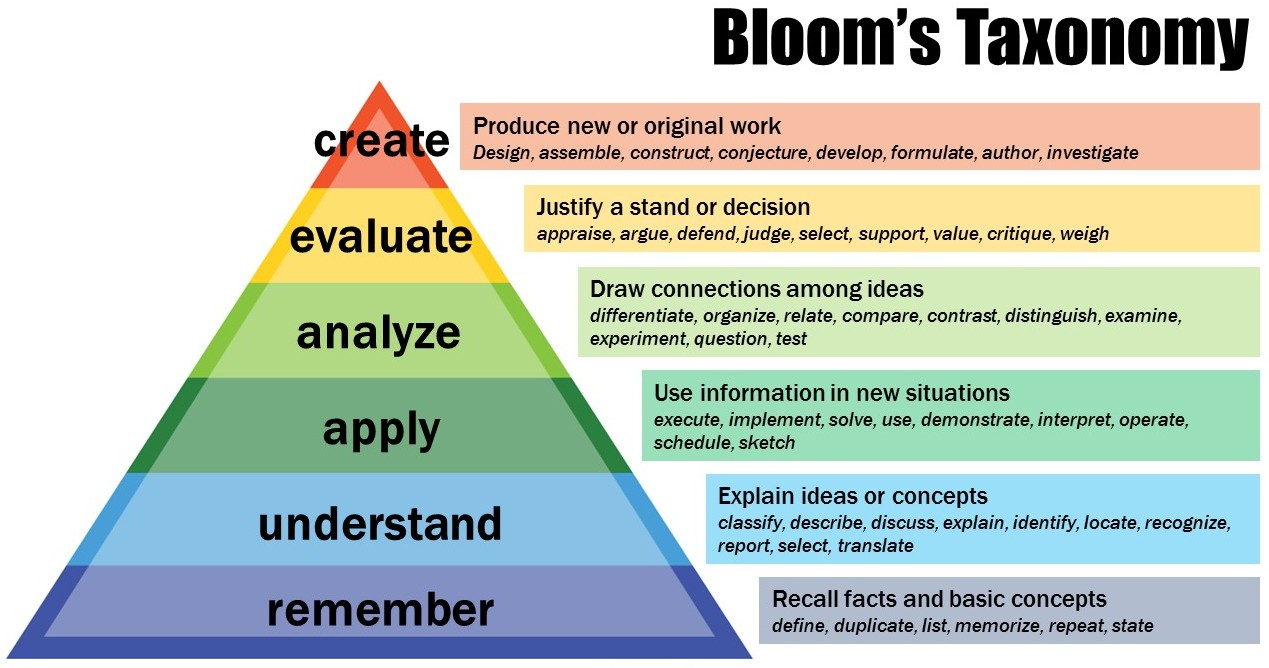
Bloom’s Taxonomy serves as a general framework of skills that requires information processing, idea creation and real-world problem-solving skills. The following taxonomy may be proposed: remembering, understanding, applying, analyzing, evaluating and creating. 


Complex Thinking Skills
Sub-Skills
Focusing
Defining the problem, goal/ objective- setting, brainstorming
Information gathering
Selection, recording of data of information
Remembering
Associating, relating new data with old
Analysis
Identifying idea constructs, patterns
Generating
Deducing, inducting, elaborating
Organizing
Classifying, relating
Imagining
Visualizing, predicting
Designing
Planning, formulating
Integration
Summarizing, abstracting
Evaluating
Setting criteria, testing idea, verifying outcomes, revising


We also discussed the structured problem solving-process known as 4D’s that also exemplifies the instructional shift in digital learning: define the problem, design the solution, do the work and debrief on the outcome.